Waranara learning spaces
Make the most of your visit to Waranara
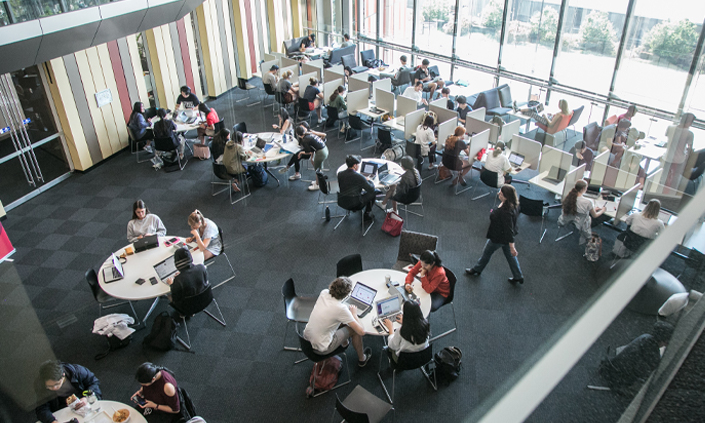
Waranara Library is a space for everyone. Please be considerate and respect the rights of everyone to research or study without unnecessary disturbance or distraction, in line with the Library Policy.
Food and drink
Non-alcoholic drinks and food are ok in the library, but we ask you avoid messy meals and keep drinks in sealed containers to avoid spills and disturbing other clients.
Place all rubbish in the bins provided and report any spills immediately to Library staff.
Noise and quiet zones
Please respect the right of others to study, learn and research.
The Library has a range of different study spaces to accommodate both group learning and quiet, individual study. Our sign-posted quiet zones are places to get work done. In these areas - minimise noise, be mindful to not disturb others, and if you need to chat with friends move to one of our non-quiet zones.
Find the right space for you - choose from Silent, Quiet or Group study spaces.
Safety and your belongings
Don’t leave your belongings unattended, including to ‘reserve’ a study space. The Library can’t take any responsibility for the security of your personal belongings.
If items are left for longer than 15 minutes on study desks or computers, they may be carefully moved aside or placed on the floor so that the space may be used by others.
Security Services are in the library building during all opening hours. If you’re feeling unsafe on campus or are concerned for the safety of others call Campus Security or see a staff member.
Smoking and vaping
Smoking and vaping are not permitted anywhere in the Library building. See the University Smoking on Campus Policy.
There are a limited number of designated smoking areas on campus, which can be found on the campus map
Accessibility
Only guide dogs and other animals approved under the University’s Disability Policy are permitted in the Library.
Presentation practice pods
Study in a Presentation Practice Pod on level 1. They are bookable for three hours for groups of up to eight people.
Current Macquarie University and Macquarie University College students can book for study only, not for teaching, social activities or commercial purposes.
Book a space now
Study booths
The study booths (one person) and collaboration booth (for up to 4 people) are located on level 2 of Waranara Library.
Study booths have an adjustable desk and chair. The collaboration booth has two sofas and a table.
All booths have power and USB connection points.
Current Macquarie University and Macquarie University College students can book for study purposes only.
The booths are not for teaching, social activities or commercial use.
Book a space now
Quiet rooms
There are 9 quiet rooms for individual study on level 1 (Q1.01 to Q1.09). These rooms are to be used by the person who books them only. They are not for group study.
Quiet rooms are available to book any time during Library level 1 opening hours. During exam periods these rooms may be unavailable as they are used for examinations.
Book a space now
Postgraduate study space
Students enrolled in approved postgraduate courses will have their campus card automatically encoded for swipe access to this area on level 3. If you have issues accessing this space, let us know.
Graduate Researcher space
Students enrolled in approved Graduate Researcher courses including MRES students, academic and professional staff are eligible to use this space on level 5 including the kitchen area. If you are eligible your campus card will be automatically encoded for swipe access to this area. If you have issues accessing this space, let us know.
Sensory space
The use of all computing facilities on campus is governed by the University's Acceptable use of IT Resources.
Computers
Computers are available on Level 2 for study and research. You'll need to log in with your OneID. Computers will automatically lock after 15 minutes if left unattended and files need to be saved to the cloud or USB.
Laptop loans
We provide laptops for loan for up to four hours from the self-service kiosk on level 3. You’ll need to be a current student or staff and will need your Campus Card to borrow.
You can store your laptop in one of our individual lockers on level 2, for up to 24 hours. You’ll need your charger to plug in. Visit staff at the info desk for locker access.
The multi-function stations (print, scan and copy) are available on levels 2, 3 4 & 5 of the Library.
- Login to iPrint.mq.edu.au with your OneID.
- Add money using PayPal, or add money to your campus card at a payment machine (found on levels 2 and 3 of the Library).
- Payment machines do not give change and change is not available in the Library.
For more information, see how to use iPrint.
Printing/photocopying | Cost |
|---|---|
Black and white, A4 paper | $0.11 (single-sided) |
Black and white, A3 paper | $0.22 (single-sided) |
Colour, A4 paper | $0.50 (single-sided) |
Colour, A3 paper | $1.00 (single-sided) |
Level 1
- Presentation practice pods
- Silent study space (rear)
- Quiet rooms
- Collection K–Z
- Curriculum collection
Level 2 (ground floor)
- Info desk
- Silent study space
- Sensory Space
- Study booths & Collaboration booth
- Quiet rooms
- Self-check borrowing
- Returns chutes
- First aid room
- Collection A–J
Level 3
- Study space
- Postgraduate space
- Laptop loans (self-service)
Level 4
- Study space
- Seminar rooms
- First aid room
Level 5
- Graduate Researchers space